Is llama.cpp v1.0 faster? I updated my llama.cpp to the newest build and benchmarked it against my two October builds on the same 8 GB RTX 4060 Ti. The answer depends on the model. For a model that fits in the graphics card, the new build reads prompts about 23% faster. For a big model that doesn't fit, there was no real change.
In my llama.cpp v1.0 post yesterday I wrote that llama.cpp "feels much faster" than a few months ago, but I had no numbers. Now I have some.
How did I test llama.cpp?
I used llama-bench, the benchmark tool that comes with llama.cpp, on three Windows CUDA 12.4 builds from GitHub:
| Build | Released | Version it reports |
|---|---|---|
| b11540 | 10 October 2026 | 0.6.0-dev |
| b11643 | 15 October 2026 | 0.6.0-dev |
| b12426 | 15 November 2026 | 1.0.0-dev (newest, after v1.0.0 = b12359) |
The PC is my usual one: Intel Core i9-14900KF, 64 GB DDR5 and an RTX 4060 Ti with 8 GB. Each build used the same model files and the same settings, with flash attention on. I tested two models:
- MiniCPM-V 4.7 1B (Q4_K_M, 0.67 GB). It fits fully in the graphics card.
- Underdog Saluki 27B (IQ2, 7.9 GB). It doesn't fit, so I put 42 of its layers on the GPU and left the rest on the CPU.
For each model I measured two things: how fast it reads a prompt (prompt processing) and how fast it writes an answer (token generation). I ran everything twice, in opposite build order, so a warm GPU couldn't favour one build.
Is llama.cpp faster for small models?
Yes, at reading prompts. The newest build read a 512-token prompt 23% faster than the 10 October build, and a 4,096-token prompt 24% faster. Writing the answer was only about 3% faster.
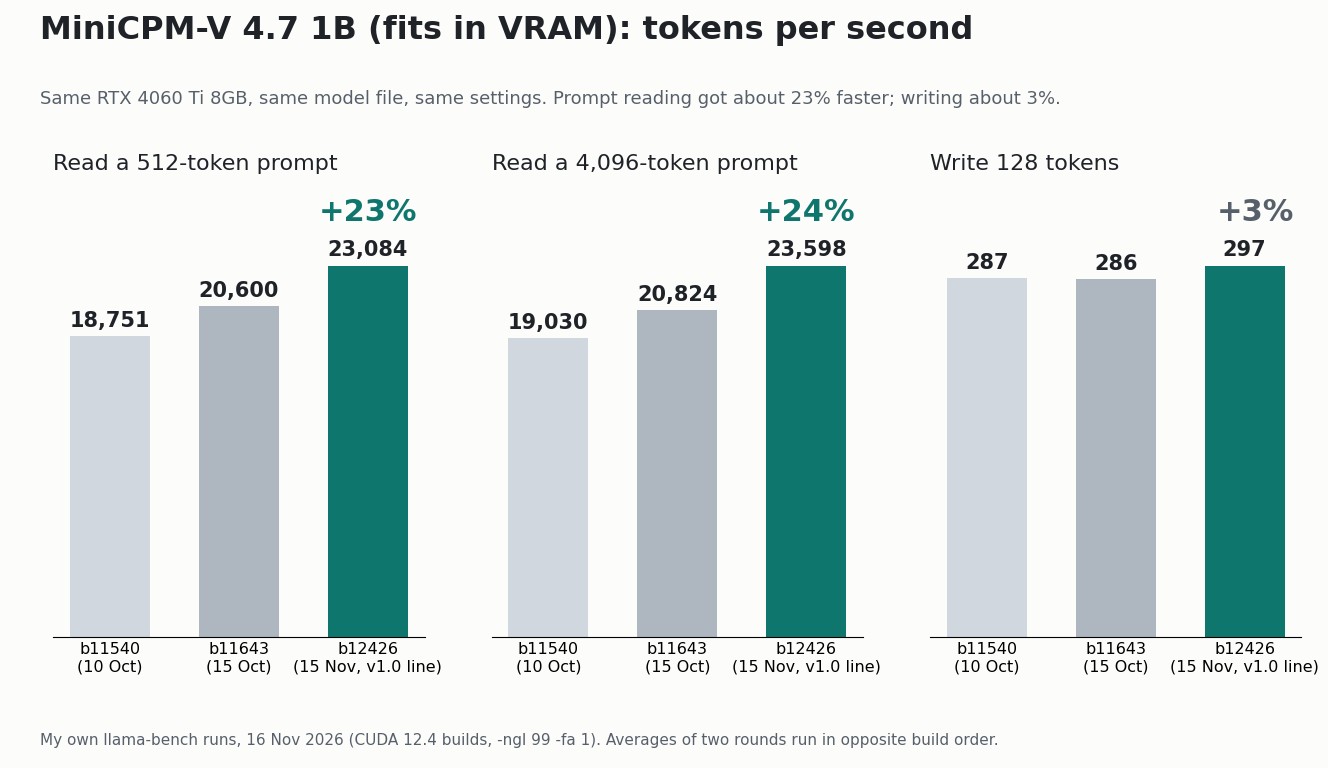
The 4,096-token result was very steady. In both rounds the three builds scored about 19,000, 20,800 and 23,600 tokens per second, and the gain shows up step by step from build to build.
Faster prompt reading matters more than it sounds. Long chats, pasted documents, code files and image prompts all have to be read before the model can answer. That's where the waiting happens on a small model, because writing is already fast at nearly 300 tokens per second.
Is llama.cpp faster for big models on an 8 GB GPU?
No, not in my test. With Saluki 27B split between the GPU and CPU, all three builds wrote at 8.4 to 8.5 tokens per second and read prompts at 40 to 43 tokens per second.
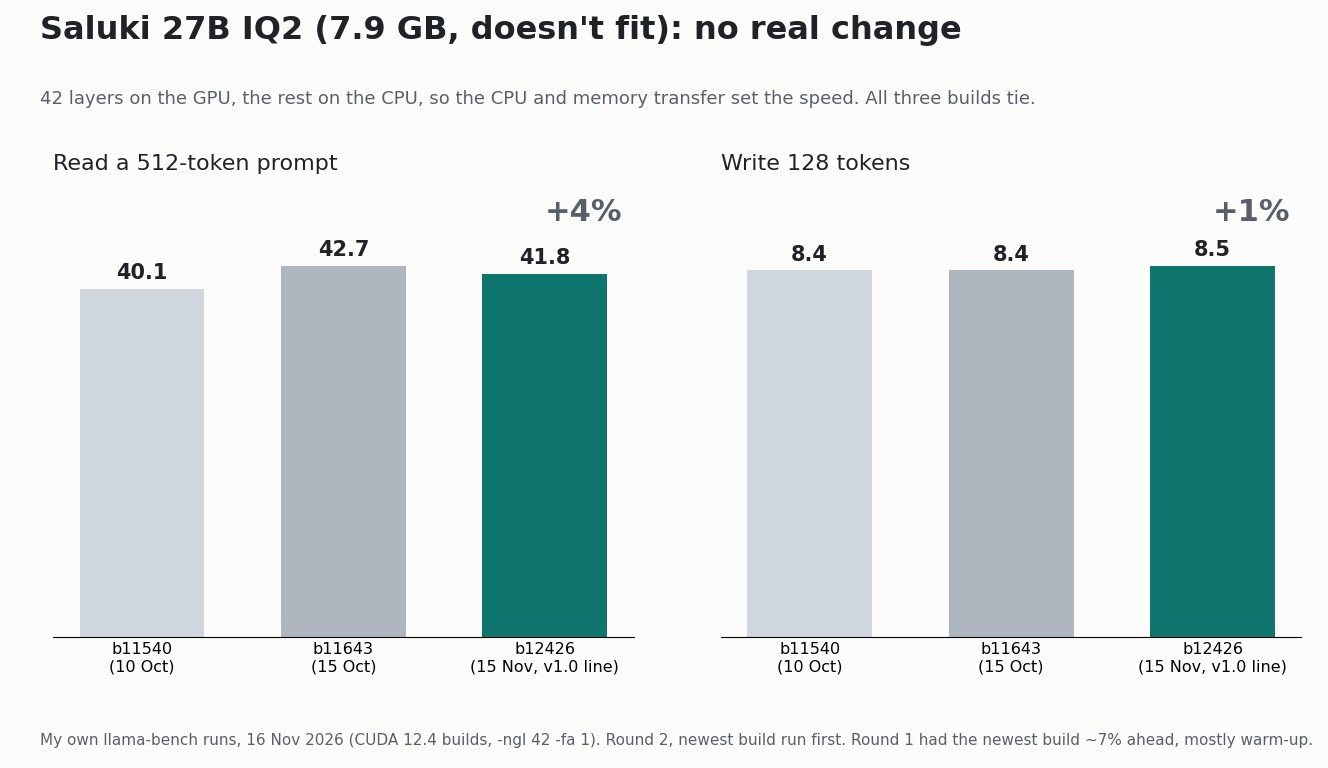
In the first round the newest build looked about 7% faster. When I ran the builds again with the newest one first, the gap disappeared. So most of that first-round "gain" was the GPU warming up, not the new code. I would have quoted it if I'd only run the test once.
The reason is simple. When part of the model sits in system memory, the CPU and the data transfer between CPU and GPU set the speed, not the graphics card. Faster CUDA code doesn't help much there.

One more note: today's Saluki numbers are lower than in my October Saluki test, even on the same old build. My PC had other apps open today, including Krita, darktable and a browser. So compare the builds within this test, not with older posts.
So was my "much faster" feeling right?
Half right. For models that fit in 8 GB, prompt reading really did get about a quarter faster in five weeks. That's a big jump for free software you just unzip. But for big models that spill into system memory, the speed was the same. The other things that make local AI feel easier, like new model support and the new web UI, aren't speed at all.
I also only tested two dense models. The new MoE expert cache in v1.0 is meant for big mixture-of-experts models on small GPUs, and I don't have one of those set up on this PC yet. That would be a good next test.
How do you update llama.cpp on Windows?
It takes a few minutes, and you can keep your old build:
- Open the llama.cpp releases page on GitHub and pick the newest build (it starts with "b"). The v1.0.0 release page itself has no Windows files; its build is b12359.
- For an NVIDIA card, download two files:
llama-bXXXXX-bin-win-cuda-12.4-x64.zipandcudart-llama-bin-win-cuda-12.4-x64.zip. There are also CUDA 13.5, Vulkan, CPU and other builds. - Unzip both into a new folder, for example
E:\llama-b12426. Don't overwrite your old folder. - Run
llama-bench.exe --list-devicesto check it finds your GPU. - Copy your old start script into the new folder and change the folder name in it.
Then run llama-bench with your own model before and after. It takes a minute or two for a small model, and it's the only way to know what an update does on your PC.
Read next
- llama.cpp v1.0 is out: what it means for local AI on 8GB
- MiniCPM-V 4.7 1B on an 8GB GPU: tested against 4.6 and 4.5
- Underdog Saluki 27B on an 8GB GPU: why I got 4.7 tokens/s
- My PC now works for AI agents: i9, 64GB RAM, 8GB GPU
Method: llama-bench from each build, 16 November 2026; Windows CUDA 12.4 builds b11540, b11643 and b12426 from the ggml-org/llama.cpp GitHub releases; NVIDIA driver 610.88. MiniCPM-V 4.7 1B Q4_K_M: -ngl 99 -fa 1 -p 512 -n 128 -r 5, plus -p 4096 -n 0 -r 3. Saluki 27B IQ2: -ngl 42 -fa 1 -p 512 -n 128 -r 3. Each test ran in two rounds with the build order reversed; the MiniCPM charts show the average of both rounds and the Saluki chart shows round 2. All numbers are my own. The two illustrations were made locally with Qwen Image 2.1, the charts are my own, and AI helped me run the tests and edit the English.