
Underdog Saluki 27B squeezes Qwen3.8-27B into a 7.89GB file, so it looks like a perfect fit for an 8GB graphics card. On my RTX 4060 Ti it ran at 4.7 tokens per second. I asked it for a 3D Earth web page, waited 30 minutes, and got an error instead of a page.
The short answer: the model doesn't fully fit, and the llama.cpp build I installed was the wrong one for an NVIDIA card. Switching to the CUDA build took the same model to 14.8 tokens per second in a benchmark, and with thinking turned off it wrote a working 3D Earth in about two and a half minutes. Later, in a long chat, I got a much richer Earth out of it, but that answer took 15 minutes. Here's what I measured, and the Earth page it wrote so you can try it yourself.
What is Underdog Saluki 27B?
It's a heavily compressed version of Qwen3.8-27B, published by ConwayResearch on Hugging Face under the Apache 2.0 licence. The full model is about 54GB. Saluki's main file, Underdog-Saluki-27B-1.0-IQ2-mix.gguf, is 7.89GB, built on ISTA-DASLab's GSQ-RCO quantisation at roughly 2.3 bits per weight.
The model card's headline is "Qwen3.8-27B in under 8 GB", and the benchmarks are honest about the trade. On their own tool-calling test (120 tasks) Saluki passed 88 against 84 for the full model. Maths is where 2 bits hurt: AIME 2025 drops from 96.7 to 79.2. For coding, SWE-bench Verified on 50 issues went from 33 to 30.
So the quality is real. The question for me was speed.
My first try: 4.7 tokens per second and a 30-minute failure
My PC is an i9 14th gen with 64GB of RAM and an RTX 4060 Ti 8GB, the same machine I used for Qwen3.8-Flash-Next on 8GB. I installed llama.cpp with winget (build b11540) and started the server with an 8,192-token context and a q8_0 KV cache. I didn't set the number of GPU layers, so llama.cpp chose it for me.
Then I asked for a single HTML file with a rotating 3D Earth. Thinking mode was on, which is the default. The model thought, and thought, at a steady 4.7 tokens per second. After 27.5 minutes it had generated 7,755 tokens, the 8K context was 100% full, and the answer was cut off before any HTML came out. When I pressed continue, the server refused:
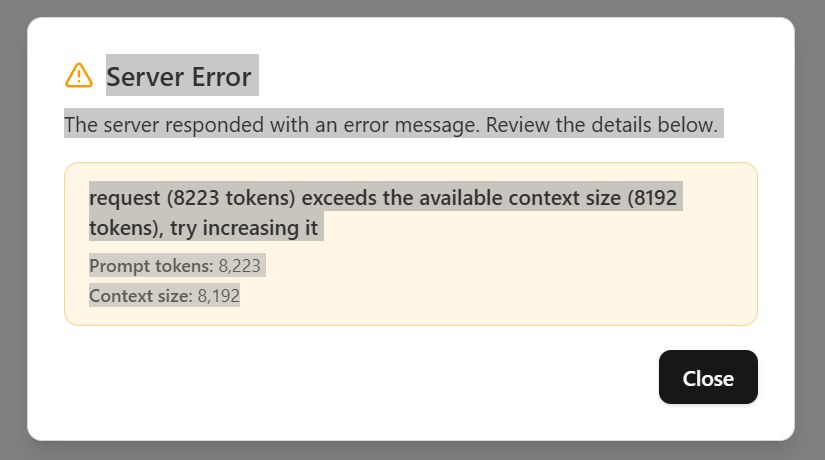
Two problems are stacked here. The speed is low, and thinking mode used the whole context before the model wrote a line of code. I looked at each one separately.
Why doesn't a 7.89GB model fit on an 8GB card?
Because the card never has 8GB free. Windows, the browser and other apps keep part of it, and the model needs more than its file size. llama.cpp has a tool called llama-fit-params that prints the memory plan before loading, and it showed the gap clearly.

My card reports 8,188MiB, but only about 7,029MiB was free with my desktop open. The weights alone need 7,256MiB. Add the KV cache and compute buffers, and putting all 65 layers on the GPU needs about 8,210MiB at 8K context and about 9,060MiB at 32K.
So llama.cpp's auto-fit kept 42 of the 65 layers on the GPU and ran the other 23 on the CPU. That split is normal for big models. It shouldn't make things this slow, though, and that led me to the bigger problem.
Vulkan or CUDA: which llama.cpp build should you use on an NVIDIA card?
CUDA. The winget package of llama.cpp is the Vulkan build. Vulkan works on almost any GPU, which is why it's the default, but on my 4060 Ti and this model it was badly slower. I downloaded the CUDA 12.4 build of the same release (b11540) from the llama.cpp GitHub page and ran llama-bench with both, changing only how many layers sit on the GPU.

The Vulkan line goes the wrong way. More layers on the GPU made it slower, from 5.75 tokens/s at 16 layers to 1.77 with all 65. At the 42 layers auto-fit picked, Vulkan gave 3.3 tokens/s and CUDA gave 12.1. That's 3.7 times faster from changing nothing but the download.
CUDA peaks at 48 layers with 14.8 tokens/s. Push past that and the card runs out of memory. On Windows the driver most likely spills into shared system memory at that point, and speed falls back to 5 tokens/s at 65 layers. More GPU layers is only better until the card is full.
| GPU layers (of 65) | Vulkan (tokens/s) | CUDA (tokens/s) |
|---|---|---|
| 0 (CPU only) | 4.70 | 5.00 |
| 16 | 5.75 | 6.46 |
| 30 | 4.67 | 8.36 |
| 42 (auto-fit) | 3.31 | 12.11 |
| 48 | 2.56 | 14.84 |
| 56 | not tested | 7.65 |
| 65 (all) | 1.77 | 5.06 |
Threads mattered much less. At 48 CUDA layers, 8 threads gave 13.6 tokens/s, 16 gave 14.2 and 24 gave 14.8.
Does it work once it's set up properly?
Yes. I restarted the server with the CUDA build, 48 GPU layers, a 16K context and a single slot (the default is 4 slots, which you don't need for one person):
llama-server -m Underdog-Saluki-27B-1.0-IQ2-mix.gguf --jinja -fa on -ngl 48 -c 16384 -np 1 -ctk q8_0 -ctv q8_0 --temp 0.6 --top-p 0.95 --top-k 20With thinking turned off ("chat_template_kwargs": {"enable_thinking": false}, which the model card recommends for direct tasks), it wrote a 4.7KB HTML page of 1,432 tokens in 2 minutes 28 seconds. The page loaded with no console errors: a textured Earth in a starfield that you can drag around.
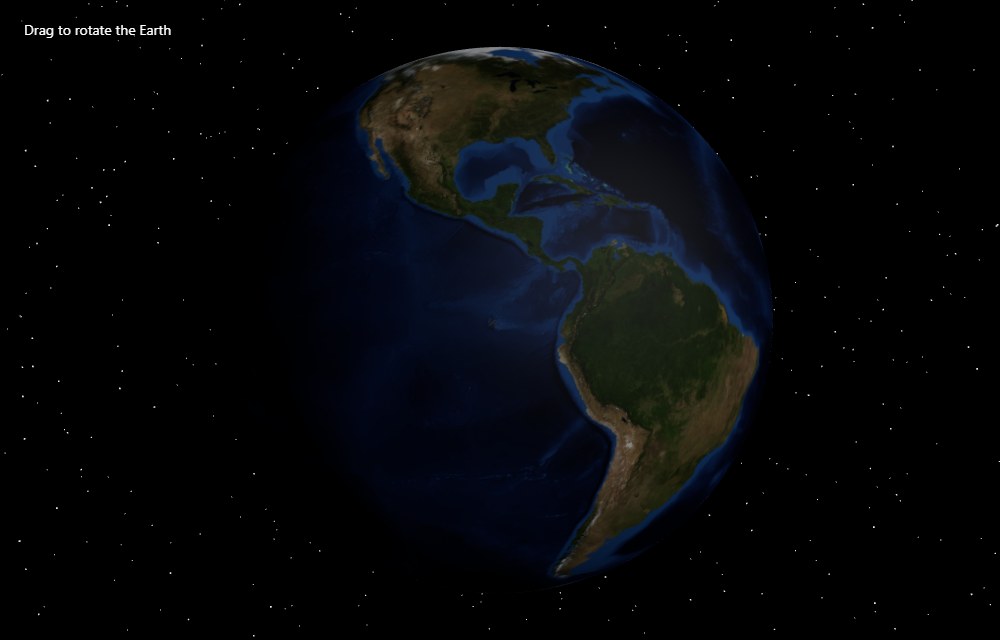
In the real server I measured 9.7 tokens per second, lower than the 14.8 benchmark. The 16K context takes more memory than llama-bench's short test, so 48 layers is already a tight squeeze. That's still twice my first try.
What happens with thinking mode on?
It runs out of room, even with double the context. I gave the same prompt to the same fast setup with thinking on and a 14,000-token limit. Saluki thought for about 12,500 tokens. In that time it drafted the whole HTML page three times inside its own reasoning, checking shader code and camera angles. Then it started writing the real answer and hit the limit halfway through the starfield code. That took 25 minutes at 9.2 tokens per second, and I got no working page.
So my first failure wasn't bad luck. For this kind of task, thinking mode needs something like 16,000 to 20,000 tokens of room. At 2-bit quality on a single 8GB card, that's half an hour of waiting. With thinking off, the same model did the job in two and a half minutes.
| Run | Speed | Tokens | Time | Result |
|---|---|---|---|---|
| Vulkan, auto-fit, 8K, thinking on | 4.7 t/s | 7,755 | 27.5 min | Context full, no page |
| CUDA, 48 layers, 16K, thinking on | 9.2 t/s | 14,000 (limit) | 25.4 min | Cut off mid-answer |
| CUDA, 48 layers, 16K, thinking off | 9.7 t/s | 1,432 | 2.5 min | Working 3D Earth |
| CUDA, 48 layers, 16K, long chat in the web UI | 4.66 t/s | 4,340 | 15.5 min | Richer 3D Earth (demo) |
My richer 3D Earth: 15 minutes in a long chat
After switching to the CUDA setup, I went back to my original chat in the llama.cpp web UI and asked again. This time it worked, and the page is far nicer than my quick test: a day side and a night side with city lights, a cloud layer, a glowing atmosphere, the 23.5 degree axial tilt, orbit and zoom with the mouse, and Space to pause. It even falls back to textures it draws itself if the image downloads fail.
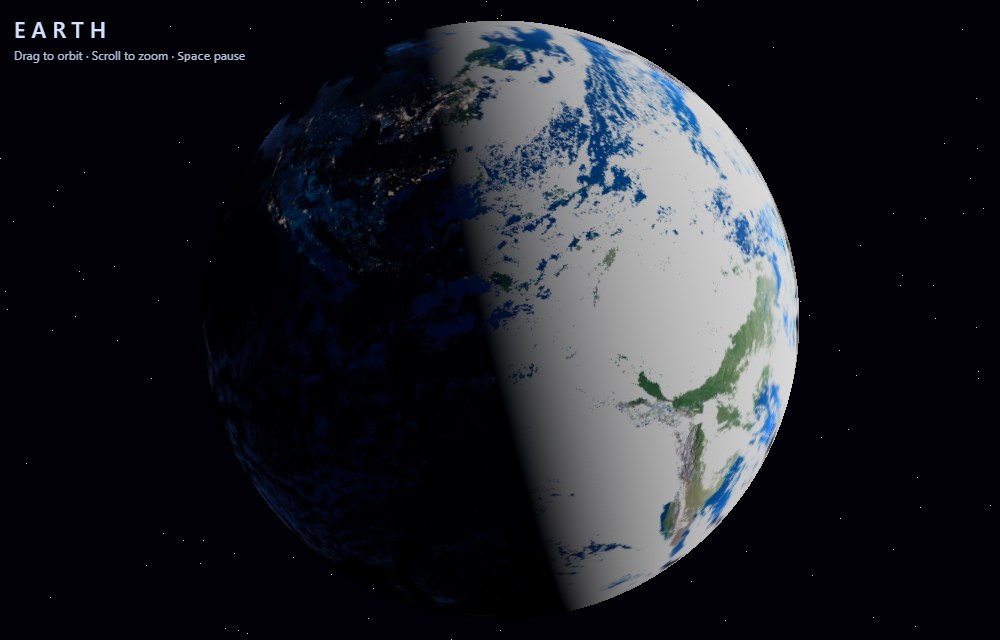
Open the live 3D Earth demo (12KB, drag to orbit, scroll to zoom). Apart from a back link, the code is exactly what the model wrote.
It isn't perfect. The cloud layer is far too thick on the day side, and the code loads a small satellite icon as the planet's shine map, which three.js flags with a warning. Those are the kinds of mistakes you'd fix in two minutes, and the kind you have to check for.
The cost was time. The chat already held my first 7,871-token conversation, and the answer was another 4,340 tokens. That took 15.5 minutes, at 4.66 tokens per second, not 9.7. The server log shows why: speed falls as the conversation gets longer.
| Tokens in the chat | Speed (same CUDA setup) |
|---|---|
| Under 500 (new chat) | 9.8 tokens/s |
| About 8,000 to 12,500 | 4.7 tokens/s |
| About 13,000 to 16,300 | 3.2 to 3.5 tokens/s |
Every new token has to look back over the whole conversation, and with part of the model on the CPU that gets expensive quickly. On an 8GB card, a long chat costs you speed as well as memory. Start a new chat for each new task.
Is a 27B model on 8GB worth it?

My verdict: still usable, but very slow. About 10 tokens per second is fine for a short answer. For a real page in a real chat I got 4.66 tokens per second, and 15 minutes is a long time to wait for 12KB of HTML. Most of my first 30 minutes went to setup mistakes, not to the model: the wrong llama.cpp build, an 8K context, and thinking mode on a task that didn't need it.
If you try Saluki on an 8GB card, here's what I'd do:
- Use the CUDA build of llama.cpp on an NVIDIA card, not the winget or Vulkan build.
- Run
llama-fit-paramsfirst, then try a few-nglvalues withllama-bench. On my card the best was 48, more than auto-fit picked. - Close the browser and other GPU apps. Every few hundred MiB you free buys another layer.
- Turn thinking off for coding and tool calls, or give it a context of at least 16K.
- Use
-np 1if you're the only user. - Start a new chat for each task. In my tests, speed fell from 9.8 to about 3.3 tokens/s as a chat grew toward 16K tokens.
I'm still impressed that a 27B model runs on a mid-range gaming card at all. If you need speed more than raw quality, a smaller model that fits entirely in VRAM will be faster. For a cheaper and faster option, see my comparison of local LLMs vs cloud APIs. And if you want something light after all this benchmarking, my browser game Block Drop 3D runs on any GPU.
Sources
Checked 11 October 2026. Model details and benchmark scores from the Underdog Saluki 27B 1.0 model card (ConwayResearch, Hugging Face). llama.cpp builds from the b11540 release. All speed and memory figures are my own measurements on one PC (i9 14th gen, 64GB RAM, RTX 4060 Ti 8GB, driver 591.86, Windows 11) using llama-bench, llama-fit-params and llama-server; your numbers will differ with other hardware and open apps. Testing and write-up done with AI assistance; images generated locally with Qwen Image 2.1.