Is Gemini Omni 1.2 Flash worth upgrading to? For me, not yet. Google released it on 5 November 2026 with longer videos (up to 15 seconds instead of 10) and better speech and lip-sync. I made a test clip with each version in Google Flow. The overall look is about the same, and 1.2 does give a better voice performance. But in Flow an 8-second clip costs me 24 credits on 1.2 and 15 credits on 1.1. Paying 60% more for a small step up doesn't make sense for the short B-roll clips I use, so I'm staying on 1.1. Both test videos are below, so you can judge for yourself.
What is Gemini Omni 1.2 Flash?
It's Google's newest video model. It makes clips up to 15 seconds long with sound, and you can edit a clip over several turns of conversation. Google's announcement lists these changes from Omni 1.1:
- Longer clips: up to 15 seconds, up from 10. You can set the length from 3 to 15 seconds, one second at a time.
- Better speech: more natural dialogue, clearer lip-sync and support for more than one speaker.
- Steadier video: less drift and morphing when the camera moves, and fewer unwanted jump cuts.
- Reference inputs: character, product or style images, motion clips up to 3 seconds, and audio cues. Google says faces, clothes and brand colours stay consistent between camera angles.
- Edits on the full clip: swap a product or background, change the lighting or weather, or switch the aspect ratio over several turns.
- Resolution: draft at 360p or 720p, then upscale finished clips to 1080p or 4K.
- Where to get it: the Gemini API (Google AI Studio), Google Cloud (Vertex AI), Flow, Google Vids, and the Gemini app for Google AI Ultra subscribers. Videos carry Google's invisible SynthID watermark.
Google didn't publish any benchmark scores. The quality claims rest on demo videos.
How do my two test videos compare?
The overall quality is about the same. The real difference is the voice: 1.2 sounds more expressive. These are two different scenes, not the same prompt run twice, so treat this as a first impression rather than a lab test. Both are the 720p files straight out of Google Flow, with no edits.
Gemini Omni 1.1 (10 seconds, 15 credits per 8 seconds in Flow)
A man at a trading desk clutches his chest while a stock chart drops behind him. The clip cuts between a wide shot, close-ups of his hand on his shirt and his face, then back to the wide shot. The look, the lighting and the cuts are good for 1.1. The sound is mostly gasps and groans.
Gemini Omni 1.2 Flash (8 seconds, 24 credits in Flow)
A man sits at two monitors full of moving blue and purple blocks. One block lights up amber, he turns, smiles and points his pen at it, saying "tick tock, tick tock". The camera moves smoothly from behind him to his side in one take. The line is delivered with more feeling, and it matches his face better than the voice in my 1.1 clip.
Put side by side, I'd struggle to tell which model made which clip from the picture alone. The voice is where 1.2 wins.
Does Gemini Omni 1.2 cost more in Google Flow?
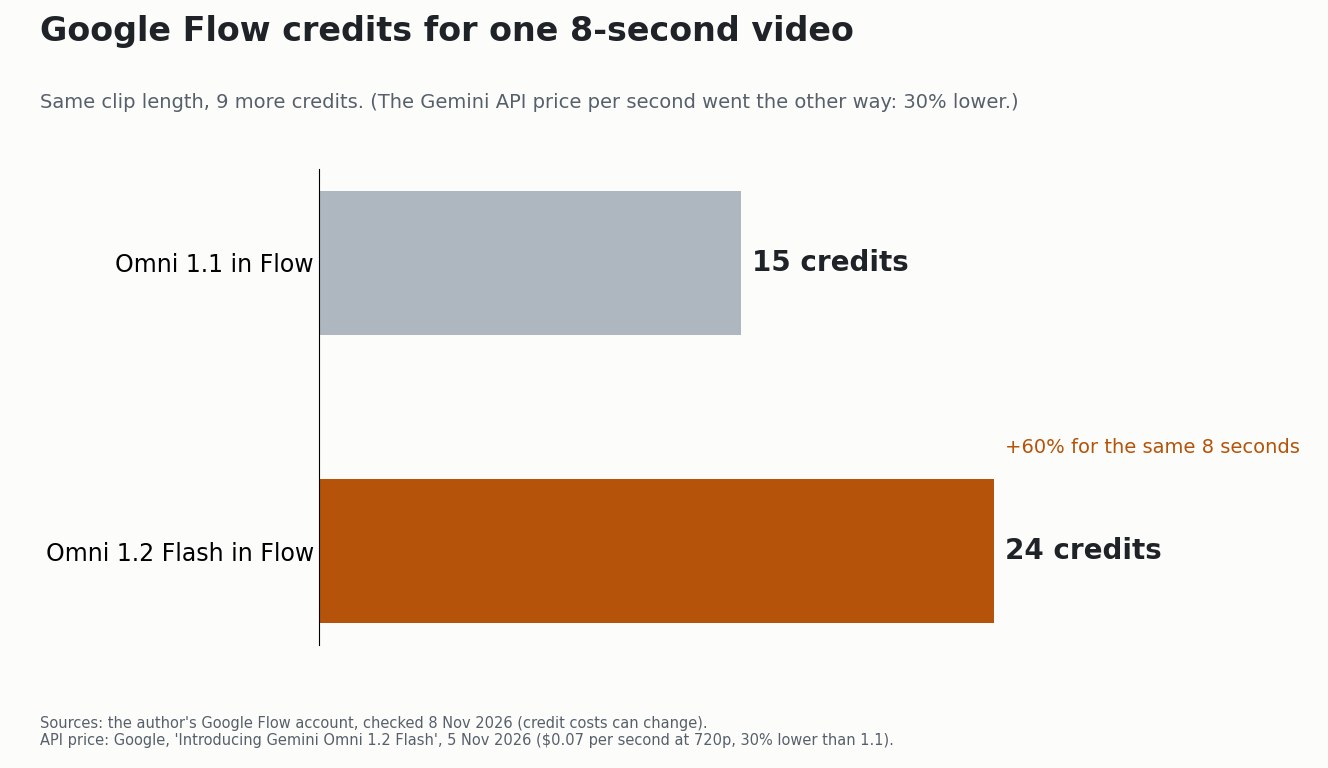
Yes. In my Flow account an 8-second clip costs 24 credits with 1.2 and 15 credits with 1.1. That's 9 more credits, or 60% more, for the same length of video.
| Omni 1.1 | Omni 1.2 Flash | |
|---|---|---|
| Longest clip | 10 seconds | 15 seconds |
| Flow credits, 8-second clip | 15 | 24 |
| Flow credits per second | about 1.9 | 3 |
| Gemini API price, 720p | about $0.10 per second (worked out from Google's "30% lower") | $0.07 per second |
| My verdict | Good enough for B-roll | Better voice, not worth 60% more |
The odd part is that Google cut the developer price. On the Gemini API, 1.2 costs $0.07 per second at 720p, which Google says is 30% lower than 1.1. Flow users like me pay in credits, and in Flow the newer model costs more, not less. Credit prices can change, so check the number Flow shows you before you generate.
Is Gemini Omni 1.2 Flash worth it?

For short B-roll, no. I use Flow clips as background shots in my podcast videos (I explained that setup in my Claude video workflow). Those are short shots that I cut between anyway. 1.1 already looks good enough for that, and every clip on 1.1 leaves 9 credits for the next one.
1.2 could be worth it if you need:
- One take longer than 10 seconds. 1.1 can't do it, so you'd otherwise have to cut or extend the clip.
- A character who speaks on screen. Better lip-sync and delivery is the one gain I could see.
- Several rounds of edits on the same clip, such as changing the background or lighting without starting again.
- API access rather than Flow. There, 1.2 is the cheaper model per second.
Which Gemini Omni version should you use in Flow?
Start with 1.1 and switch to 1.2 only for the shots that need a longer take or real dialogue. That way you pay the extra credits only where you can actually see and hear the difference. If you're making a faceless channel with lots of short shots, as I described in my faceless YouTube workflow, the cheaper model gets you more clips for the same plan.
For Google's bigger picture this autumn, see Gemini 4 Carbon.
Sources
- Google, "Introducing Gemini Omni 1.2 Flash", 5 November 2026: clip length, new features, resolutions, availability, $0.07 per second at 720p (30% lower than 1.1), SynthID.
- Flow credit costs (15 and 24 credits for 8 seconds) and both test videos: my own Google Flow account, 8 November 2026.
Checked 8 November 2026. The two test videos were made in Google Flow and are shown unedited, with Google's watermarks left in place. The illustrations were made locally with Qwen Image 2.1, the chart was drawn from my own Flow numbers and Google's announcement, and AI helped me research and edit this post.