NVIDIA's Nemotron 3.5 Parse is a small open model that turns a picture of a document page into clean text, with the tables, headings and reading order kept. It has only about 0.63 billion parameters, so I tried it on my own PC. On an RTX 4060 Ti 8GB it used about 1.5 GB of video memory and read a page in 7 to 8 seconds. It read a fake scanned patient summary with every name, date and medicine dose correct.
That is what makes it interesting to me. Legal papers and patient records are exactly the files you don't want to upload to someone else's cloud. A model this small can read them on the computer under your desk.
What is Nemotron 3.5 Parse?
It is a document parser: you give it an image of one page and it gives back the text in Markdown, tables in LaTeX, plus a box and a label for every block on the page. NVIDIA released it in October 2026 on Hugging Face and on its build.nvidia.com API site.
For each block it reports:
- The text, with headings as Markdown and tables as LaTeX. NVIDIA's helper scripts can turn tables into HTML, Markdown, JSON or CSV.
- A class, such as Title, Section-header, Text, List-item, Table, Page-header or Page-footer.
- A bounding box, so you know where on the page each block came from.
- Reading order, so two columns don't get mixed together.
Under the hood it is a vision encoder (NVIDIA's C-RADIOv4) feeding a 10-layer mBART text decoder. The licence is the OpenMDW License 1.1, and NVIDIA says the model is ready for commercial or non-commercial use. That's another open-weight release from NVIDIA after Nemotron for Science, and I like seeing it.
Is it good for legal documents and patient records?
Yes, for getting the text and tables out, as long as a person checks anything that matters. Contracts, leases, discharge summaries and lab reports are full of tables, numbered clauses and small print. A parser that keeps that structure saves a lot of copy and paste.
Two things make it a good fit:
- It runs locally. The weights are open and small. A law office or clinic can keep every page on its own machine instead of sending it to a cloud API.
- It keeps the structure. A medicine list comes back as a real table with rows and columns, not one long line of words. That's what you need before you feed the text to a search system or an AI assistant.
NVIDIA is also clear about the limits. Its model card says the model "is not intended to make life-critical, legal, medical, financial, or safety-critical decisions without downstream validation and human oversight." It also warns that the model "may miss text, hallucinate structure" or put blocks in the wrong order, and that it will pull out any personal data it can see in the image. So use it to read the paperwork faster, not to decide anything on its own.
One more privacy point: the build.nvidia.com endpoint is a trial service. Don't send real client or patient files there. Run the open weights locally instead.
Can Nemotron 3.5 Parse run on an 8GB GPU?
Yes, easily. I ran it on my RTX 4060 Ti 8GB in Windows 11 using NVIDIA's own Transformers example, in BF16, with no quantisation. The model loaded in 3.5 seconds and took 1.2 GB of video memory. Peak use while reading a page was 1.5 GB.
To keep real people out of it, I made three fictional test pages: a residential lease with a rent table, a hospital discharge summary with a medicine table, and a "bad scan" copy of that summary. The scan was tilted, blurred, speckled and saved as a low-quality JPEG. Every page is marked as a test document, and all names and numbers are made up. I ran each page twice and took the second run.
| Test page (fictional) | Time per page | Peak VRAM | What it got wrong |
|---|---|---|---|
| Lease agreement (clean) | 7.9 s | 1.5 GB | One signature date line came out as ___/__/2026 instead of ___/___/2026; three of the four numbered headings were tagged as plain text |
| Discharge summary (clean) | 7.1 s | 1.5 GB | Nothing in the text. It added bold to the patient's name and record number |
| Same summary, fake bad scan | 7.1 s | 1.5 GB | Dropped one full stop ("michaelleung info") and the bold on "Penicillin". Every name, date and dose was right |
The bad scan impressed me most. It got every number right: the date of birth, admission and discharge times, the record number, 5 mg and 25 mg doses, an eGFR of 68 and the follow-up dates. It even kept "1.73m²" as a proper superscript. The mistakes were all cosmetic: a missing full stop, lost bold text and heading levels that changed between the clean and scanned copies.
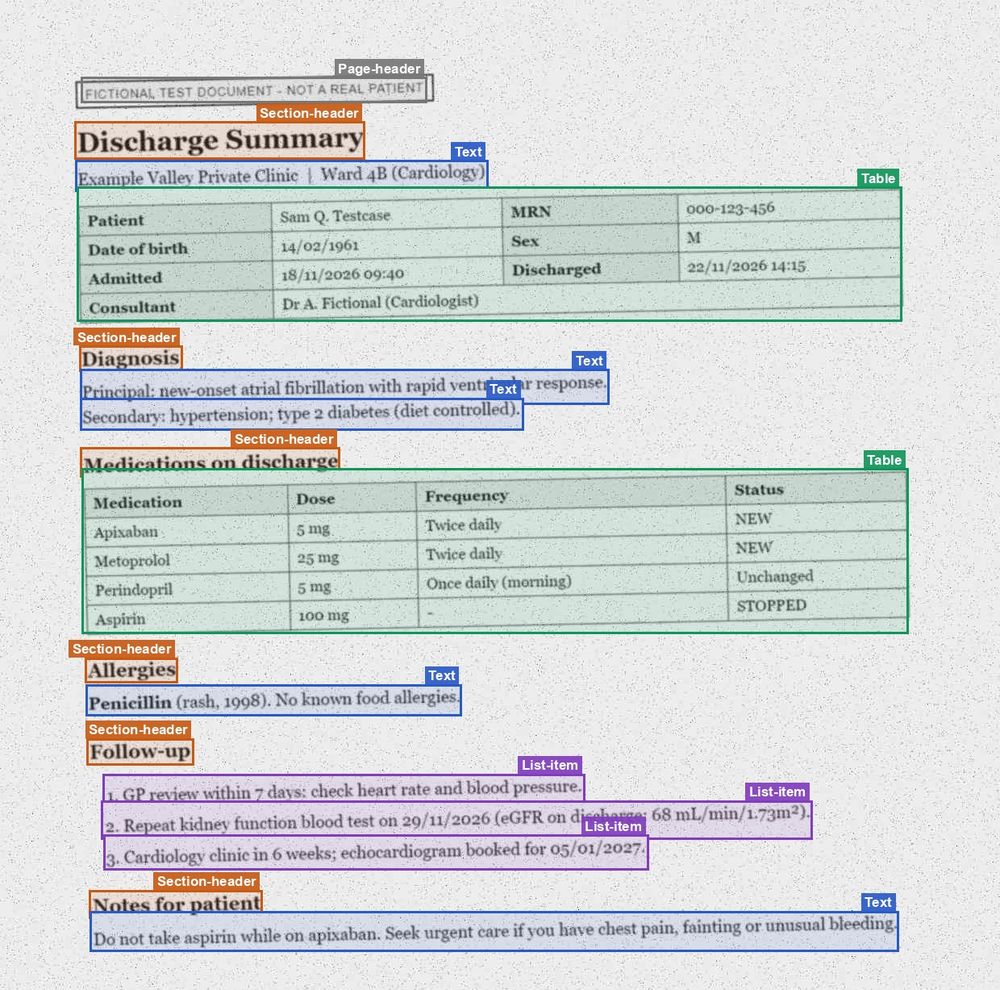
Image source: my own test, 28 November 2026. The page is a fictional discharge summary I made for this post (not a real patient), saved as a deliberately poor "scan". The coloured boxes and labels are drawn from Nemotron 3.5 Parse's actual output on my RTX 4060 Ti 8GB, using the coordinates and classes the model returned. No AI image generator was used for this picture.
Above is the real output drawn back onto the scanned page. Each coloured box is a block the model found, and the label is the class it chose. The two tables came back like this (shortened):
Medication & Dose & Frequency & Status
Apixaban & 5 mg & Twice daily & NEW
Metoprolol & 25 mg & Twice daily & NEW
Perindopril & 5 mg & Once daily (morning) & Unchanged
Aspirin & 100 mg & - & STOPPED
A few setup notes if you try it yourself:
- NVIDIA lists Linux as the supported system, but the Transformers route worked on Windows for me.
- It needs recent packages: PyTorch 2.11 or newer and Transformers 5.14 or newer. My ComfyUI install was too old, so I made a separate Python environment. The CUDA build of PyTorch is about a 3 GB download.
- The model files are about 2.5 GB. It reads one page image at a time, so render PDFs to images first. NVIDIA suggests PyMuPDF at 150 dpi.
How does it compare with other document parsers?
On NVIDIA's own ParseBench table it scores 69.05, ahead of PaddleOCR-VL 1.6 at 67.43 and the older Nemotron Parse 2.0 at 64.46. NVIDIA calls it the top ParseBench model under 1 billion parameters. It is also much faster on NVIDIA's test: 14.21 pages per second on one H100, about 4.6 times PaddleOCR-VL 1.6.
| ParseBench (higher is better) | Nemotron 3.5 Parse | Nemotron Parse 2.0 | PaddleOCR-VL 1.6 |
|---|---|---|---|
| Mean score | 69.05 | 64.46 | 67.43 |
| Tables | 72.60 | 70.41 | 67.77 |
| Charts | 49.89 | 31.59 | 54.24 |
| Content faithfulness | 86.83 | 84.72 | 82.71 |
| Semantic formatting | 65.56 | 65.36 | 54.64 |
| Visual grounding | 70.26 | 70.23 | 77.80 |
| Pages per second (one H100) | 14.21 | 3.97 | 3.09 |
It isn't best at everything. PaddleOCR-VL 1.6 still wins on charts (54.24 against 49.89) and on visual grounding (77.80 against 70.26). These are NVIDIA's numbers, with Paddle's accuracy taken from Paddle's published results. NVIDIA also reports a big jump on multilingual text: character error on its MOSCAR set fell from 4.25 to 1.46, and the Indic-language score rose from 67.44 to 82.00.
Don't compare my 7 seconds a page with NVIDIA's 14 pages a second. NVIDIA used a data-centre H100, an optimised serving setup and speculative decoding. I used plain Transformers, one page at a time, on a home card. At my speed a 20-page lease takes about two and a half minutes, which is fine for a small office.
Who should try Nemotron 3.5 Parse?
- Small law firms, clinics and accountants who want searchable text from scanned files without uploading them anywhere.
- Anyone building a private document search (RAG) system at home or at work. Clean tables and headings make the search answers much better.
- 8GB GPU owners generally. At 1.5 GB it can sit next to a small local chat model, as long as you leave room for it. See my llama.cpp benchmark on the same card and the PC I use for local AI.
Skip it if you mainly need charts turned into data (Paddle does better there) or handwriting. NVIDIA lists handwriting, low-resolution scans and unusual layouts as weak spots. My next test will be a real multi-page PDF with my own non-private paperwork, to see how it handles page breaks and longer tables.
Sources (checked 28 November 2026)
- NVIDIA, Nemotron 3.5 Parse model card on build.nvidia.com: release, architecture, licence, intended use, limitations and the ParseBench, MOSCAR and IndicVision tables.
- NVIDIA, Nemotron-3.5-Parse on Hugging Face: weights, Transformers example, package versions and PDF tips.
- My own test on an RTX 4060 Ti 8GB, Windows 11, PyTorch 2.13 (CUDA 13.0), Transformers 5.19, BF16, 28 November 2026. The test pages are fictional and made for this post.
I wrote this article with help from AI for research and drafting. I checked the figures against NVIDIA's pages, and the test results are from my own PC. The cover and two other images were made with Qwen Image 2.1 on my PC; the boxed page is real model output.