Two days ago I wrote that Gemini 4 Neon scores very close to Claude Opus 5.5 on Google's own benchmark table. Now I've used it on real work. I asked Neon to redesign the desktop app I use for my weekly supermarket price comparisons, and the result is very nice. To my eye it looks close to what I get from Opus 5.5. It isn't perfect, though, and I'll show you the rough edges too.
There's also a deal worth knowing about. Google is running a Black Friday offer on its AI plans, and I used it to renew my Google AI Pro plan for a year.
What did Gemini 4 Neon build?
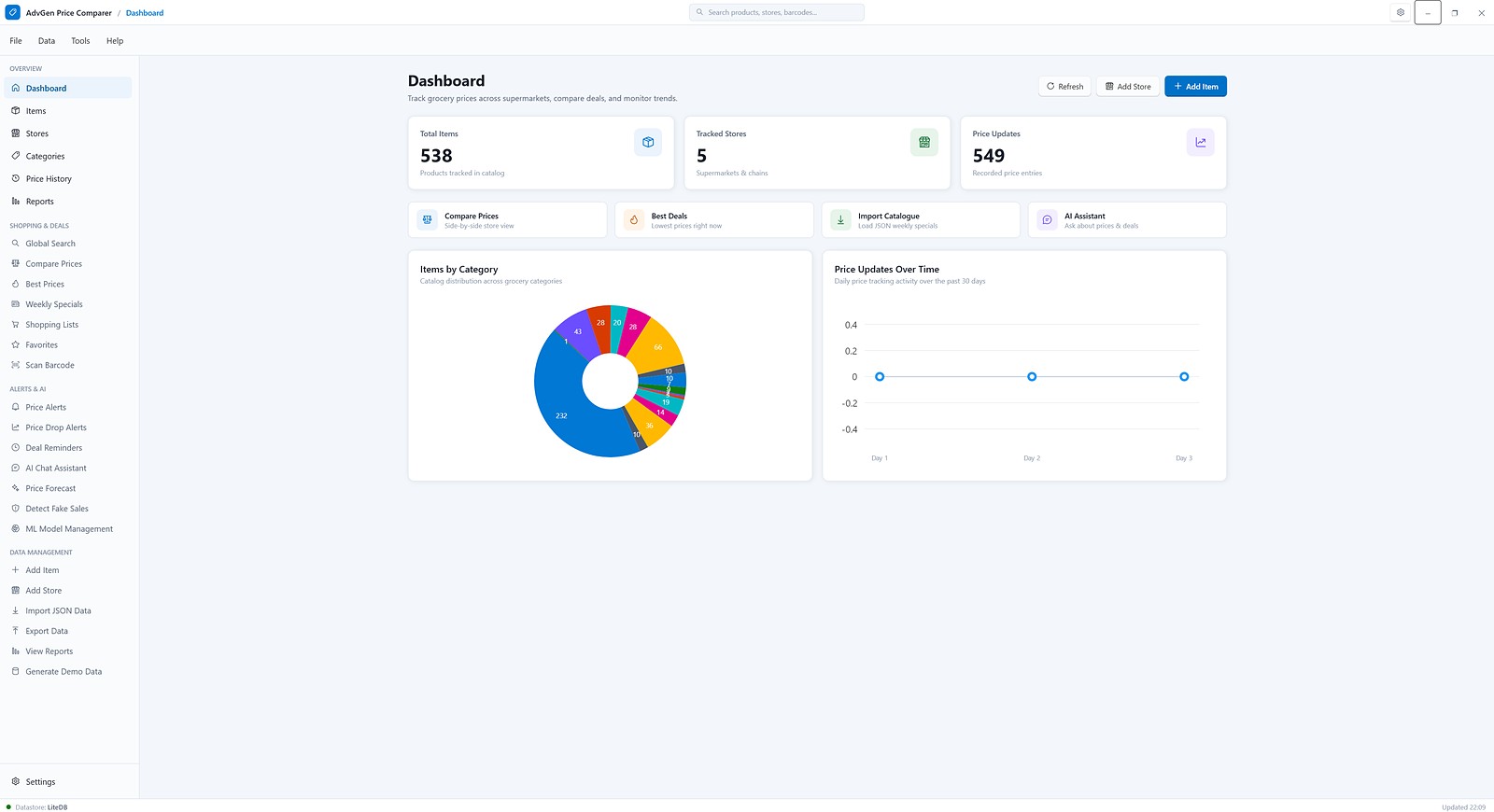
It built a new dashboard for AdvGen Price Comparer, my own Windows desktop app. I use it to track Coles, Woolworths, ALDI and other Brisbane supermarket prices, and it produces the reports in my weekly price comparison archive. The app is built with WPF on .NET and keeps its data in a small local LiteDB database.
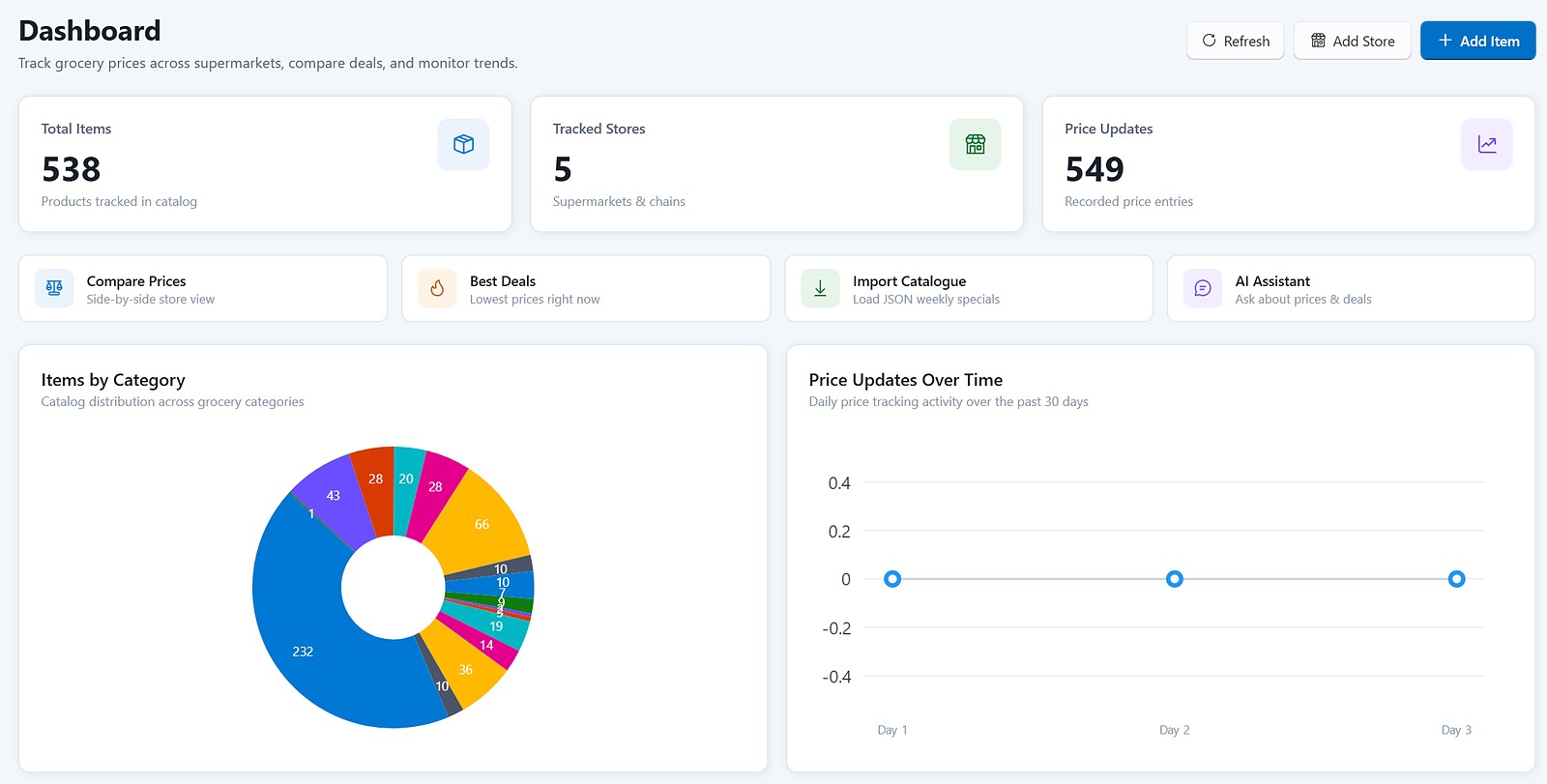
Here is what the new screen has:
- A grouped sidebar. Menu items sit under clear headings: Overview, Shopping & Deals, Alerts & AI, and Data Management. Each item has a small line icon.
- Three stat cards along the top: 538 items, 5 stores and 549 price updates. Each has a soft coloured icon tile.
- Four quick-action cards: Compare Prices, Best Deals, Import Catalogue and AI Assistant. Each has a one-line description.
- Two charts: items by category (a donut chart) and price updates over time.
- A search box in the title bar for products, stores and barcodes, plus Refresh, Add Store and Add Item buttons.
Under the hood, Neon replaced my old light sky-blue accent (#87CEEB) with the standard Windows 11 blue (#0078D4). It also added a set of named colours for surfaces, cards, borders, text and status badges, so every screen can share the same look. The main window file alone changed by about a thousand lines.
Does it look like Opus 5.5 work?
To me, yes. That is my opinion, not a benchmark. When I ask Claude Opus 5.5 for a UI, I usually get the same style: plenty of white space, cards with soft shadows, small grey helper text under each title, and coloured icon tiles. Neon gave me that same calm, finished look on the first try.
That matches the numbers. On Google's model card, Neon beats Opus 5.5 on 16 of 19 tests, and the two overall scores are only one or two points apart. It's also a big step up from what I saw when I tested Gemini 4 Argon on a homepage.
What still needs fixing?
Two things, and both are easy to miss if you only glance at the screenshot:
- The price trend chart shows no data. The subtitle says "past 30 days", but the chart shows only Day 1 to Day 3, all at zero, with an axis that runs from -0.4 to 0.4. Meanwhile the card above says there are 549 price updates. The design is fine; the data behind it isn't wired up properly yet.
- Small pie slices crowd their labels. Categories with fewer than 10 items stack their numbers on top of each other. A legend, or grouping the small ones into "Other", would fix it.
So my advice is the same as with any AI coding tool: run the app and look at every screen yourself. A good-looking layout can still hide a chart that shows the wrong thing.
How good is the Black Friday deal?
Google's AI plans page currently says: "Member early access: Save up to 50% on selected Google AI plans for Black Friday." The page doesn't list which plans or when the offer ends; you see the details when you open the offer in your own account.
On my account, the offer was up to 50% off annual Google AI Plus and Google AI Pro plans, running until 26 November 2026. I already had Pro, so I renewed it for a full year. For me it's a very good deal: Pro is where Neon is available, and I use Gemini every day for writing.
| Item | What I found |
|---|---|
| Google's banner | Up to 50% off selected Google AI plans for Black Friday (member early access) |
| On my account | Annual Google AI Plus and Google AI Pro, until 26 Nov 2026 |
| Normal Pro price (Australia) | A$32.99 a month; annual billing normally saves up to 16% |
| Is Neon included? | Yes on Pro and Ultra. Google doesn't list Neon for AI Plus. |
| After the offer | Google's offer terms say the plan renews at the standard price until you cancel |
Two things to check before you pay. First, Google's special-pricing terms (updated 17 November 2026) say some offers are only for new Google One users and that eligibility varies by country, so your account may show a different offer from mine. Second, if you want Neon, pick Pro. AI Plus is cheaper, but Google lists Neon for Pro and Ultra only.

Should you renew annually to get Neon?
If you already pay for Google AI Pro and plan to keep it, yes. Locking in a year at a Black Friday price is better than paying the full monthly price, and Neon is now a strong model for both writing and UI work. If you're not sure Gemini suits you, try a month first, because the annual plan is a full-year commitment.
What's next?
This UI job was my first real coding test of Neon, and it went well. The bigger test is still to come: I'll take one real project, build it with Neon in Google Antigravity, build the same thing with Claude Opus 5.5, and compare the results. That's where Opus still leads on Google's own coding benchmarks, so it should be a close fight. You can read about the other Gemini 4 models in my posts on Gemini 4 Hydrogen and Gemini 4 Carbon.
Sources
- Google AI plans (Black Friday banner, plan prices, Australia): one.google.com/about/google-ai-plans
- Google AI Pro and Ultra subscriptions (Neon availability): gemini.google/subscriptions
- Google One special pricing offer terms (updated 17 Nov 2026): one.google.com/offer/specialoffer
- Gemini 4 Neon model card: Google DeepMind
- The UI redesign, screenshot and Black Friday offer details are from my own app and my own Google account.
Checked 21 November 2026. I used AI to help research and draft this post, and the illustrations were made with Qwen Image 2.1. The dashboard screenshots are real screenshots of my app.